制作一个wordpress通用的简易优惠券复制模块
 摘要
摘要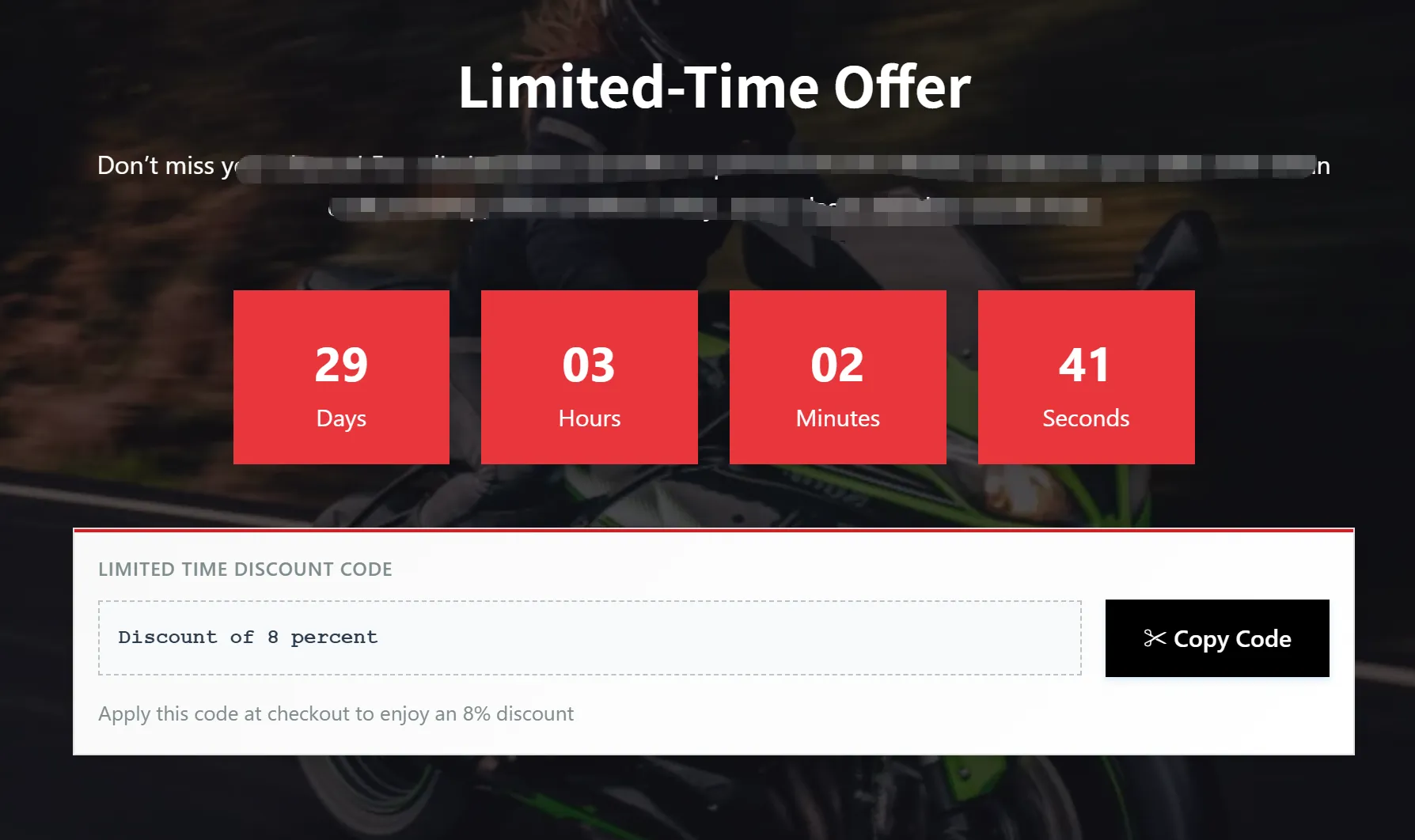
最近接到一个woocommerce商城网站维护项目,协助改一些东西。其中有一个需求是在首页添加优惠倒计时模块。本来想装个插件的,但用户的服务器配置似乎不高,所以还是不装插件好,最终在AI协助下生成了一个简易的优惠券复制模块,如上图所示。
接下来分享一下如何制作。
步骤一:设置woocommerce优惠券
首选在网站后台,woocommerce的营销功能中添加优惠券,设置需要的折扣,然后根据需要设置优惠券限期。
步骤二:制作倒计时+优惠券复制模块
这里倒计时和优惠券是分开做的。(客户的网站使用的是elementor编辑器)
1.打开首页,进入Elementor编辑模式。在需要的地方添加一个容器,做好排版,这个可以自行发挥,也可以直接参考我的。
2.添加倒计时模块,这个是使用了Elementor(需要pro)自带的倒计时模块,然后根据woocommerce优惠券中设置的时间来设置倒计时了,根据需要调整一下倒计时的颜色、大小等样式。其实到了这一块,这个倒计时模块也勉强可以了,你可以在下面加一行文本,显示优惠码,然后让用户选择复制即可。如需更好的体验,就继续下一步吧。
3.接下来就添加优惠券复制模块。这里其实主要就是添加了一个点击复制的动作,用户复制会方便一些。这个功能以前没AI或没插件的情况下,想做出来还有点麻烦。现在有了AI就简单了,下面是我最终使用的优惠券复制模块的代码。
<style>

  .coupon-card {
    background: linear-gradient(135deg, #f9f9f9 0%, #ffffff 100%);
    border: 1px solid #e0e0e0;

    padding: 15px;
    box-shadow: 0 4px 12px rgba(0, 0, 0, 0.08);
    position: relative;
    overflow: hidden;
  }

  .coupon-card:before {
    content: "";
    position: absolute;
    top: 0;
    left: 0;
    right: 0;
    height: 2px;
    background: #D81C22;
  }

  .coupon-label {
    display: block;
    font-size: 12px;
    color: #7f8c8d;
    font-weight: 600;
    margin-bottom: 8px;
    text-transform: uppercase;
    letter-spacing: 0.5px;
  }

  .coupon-content {
    display: flex;
    align-items: center;
    justify-content: space-between;
    margin-top: 10px;
  }

  .coupon-code {
    font-family: 'Courier New', monospace;
    font-size: 13px;
    font-weight: 700;
    color: #2c3e50;
    background: #f8f9fa;
    padding: 12px;
    border: 1px dashed #bdc3c7;
    flex-grow: 1;
  }

  .copy-btn-modern {
    background: #000;
    color: white;
    border: none;
    padding: 12px 24px;
    cursor: pointer;
    font-size: 15px;
    font-weight: 600;
    margin-left: 15px;
    transition: all 0.3s ease;
    white-space: nowrap;
    box-shadow: 0 2px 4px rgba(52, 152, 219, 0.2);
  }

  .copy-btn-modern:hover {
    background: #E8363C;
    transform: translateY(-1px);
    box-shadow: 0 4px 8px rgba(52, 152, 219, 0.3);
  }

  .copy-btn-modern:active {
    transform: translateY(0);
  }

  .copy-btn-modern.copied {
    background: #D81C22;
  }

  .tooltip-modern {
    position: absolute;
    top: -40px;
    left: 50%;
    transform: translateX(-50%);
    background: #2c3e50;
    color: white;
    padding: 8px 16px;
    border-radius: 6px;
    font-size: 13px;
    opacity: 0;
    visibility: hidden;
    transition: all 0.3s ease;
    white-space: nowrap;
    box-shadow: 0 3px 6px rgba(0, 0, 0, 0.1);
  }

  .tooltip-modern:after {
    content: '';
    position: absolute;
    top: 100%;
    left: 50%;
    transform: translateX(-50%);
    border-width: 6px;
    border-style: solid;
    border-color: #2c3c3c transparent transparent transparent;
  }

  .tooltip-modern.show {
    opacity: 1;
    visibility: visible;
  }

  .discount-info {
    font-size: 13px;
    color: #7f8c8d;
    margin-top: 12px;
  }
</style>

<div class="coupon-modern">
  <div class="coupon-card">
    <span class="coupon-label">Limited Time Discount Code</span>

    <div class="coupon-content">
      <div style="position: relative; flex-grow: 1;">
        <div class="coupon-code">Discount of 8 percent</div>
        <div class="tooltip-modern" id="modernTooltip">Code copied to clipboard!</div>
      </div>

      <button class="copy-btn-modern" onclick="copyCouponCodeModern()">✂ Copy Code</button>
    </div>

    <div class="discount-info">Apply this code at checkout to enjoy an 8% discount</div>
  </div>
</div>

<script>
function copyCouponCodeModern() {
  const couponCode = "Discount of 8 percent";
  navigator.clipboard.writeText(couponCode).then(() => {
    const tooltip = document.getElementById("modernTooltip");
    const btn = document.querySelector(".copy-btn-modern");

    // Show tooltip
    tooltip.classList.add("show");

    // Change button text and style
    btn.textContent = "Copied!";
    btn.classList.add("copied");

    // Reset after 2 seconds
    setTimeout(() => {
      tooltip.classList.remove("show");
      setTimeout(() => {
        btn.textContent = "✂ Copy Code";
        btn.classList.remove("copied");
      }, 300);
    }, 2000);

  }).catch(err => {
    console.error("Failed to copy: ", err);
    alert("Failed to copy code. Please try again or copy manually.");
  });
}
</script>
里面的【<div class=”coupon-code”>Discount of 8 percent</div>】这里填写你在woocommerce中设置的优惠券码即可。然后把这个代码整体复制,添加到一个HMTL模块就可以了。

效果如上图所示,用户点击复制后会有提示,然后结账时粘贴优惠券就行了。
上面的优惠券复制模块代码是通用的,大家用到任何页面编辑器都是可以的,甚至其它非wordpress网站也可以,有需要就直接拿去用吧😀。

wordpress外贸建站服务

WORDPRESS外贸建站案例

wordpress主机/服务器推荐

WordPress外贸网站包年维护

玩转云服务器和虚拟主机

常见问题

© Copyright 2020~2026. 悦然网络工作室/悦然wordpress建站 专注中小企业wordpress建站 All Rights Reserved.网站地图
本站图片来源为Pexels、Pixabay、Freepik、Unsplash等图片库的免费许可,CC0协议;还有部分为自己手绘或AI生成,版权碰瓷请自重!法律服务:law@yueranseo.com
蜀ICP备20016391号-1
 川公网安备 51011502000367号