wordpress独立站单独设置内容页面的H标题字体大小

大多数主题或者页面编辑器都有H标题预设功能,但这个预设一般情况下是仅针对首页等主要页面的,所以预设的H标题有可能很大,用在产品详情或文章详情页时就不是那么好看了。有没办法单独设置内容页面的H标题字体大小呢?当然有的。
以Elementor编辑器为例,我们可以设置多个全局字体大小预设,或者是使用最新的Elementor V4全局字体管理;Greenshift插件也有一个Global Elements设置项。不过这种修改插件预设的方法可能会稍微复杂,接下来悦然wordpress建站直接分享一个近期用到的一组CSS预设,直接把它添加到内容模块的自定义CSS中即可。
/* 统一:加粗 + 首字母大写 */
selector h2,
selector h3,
selector h4,
selector h5,
selector h6 {
    font-weight: 700 !important;
    text-transform: capitalize !important;
}

/* 桌面端 */
selector h2 { font-size: 30px !important; }
selector h3 { font-size: 28px !important; }
selector h4 { font-size: 25px !important; }
selector h5 { font-size: 22px !important; }
selector h6 { font-size: 20px !important; }

/* 平板 ≤768px */
@media (max-width: 768px) {
    selector h2 { font-size: 28px !important; }
    selector h3 { font-size: 25px !important; }
    selector h4 { font-size: 22px !important; }
    selector h5 { font-size: 20px !important; }
    selector h6 { font-size: 18px !important; }
}

/* 手机 ≤480px */
@media (max-width: 480px) {
    selector h2 { font-size: 25px !important; }
    selector h3 { font-size: 22px !important; }
    selector h4 { font-size: 20px !important; }
    selector h5 { font-size: 18px !important; }
    selector h6 { font-size: 16px !important; }
}
如上面代码所示,它分别设置了H2到H5的字体样式大小,你也可以根据需求自行修改微调。
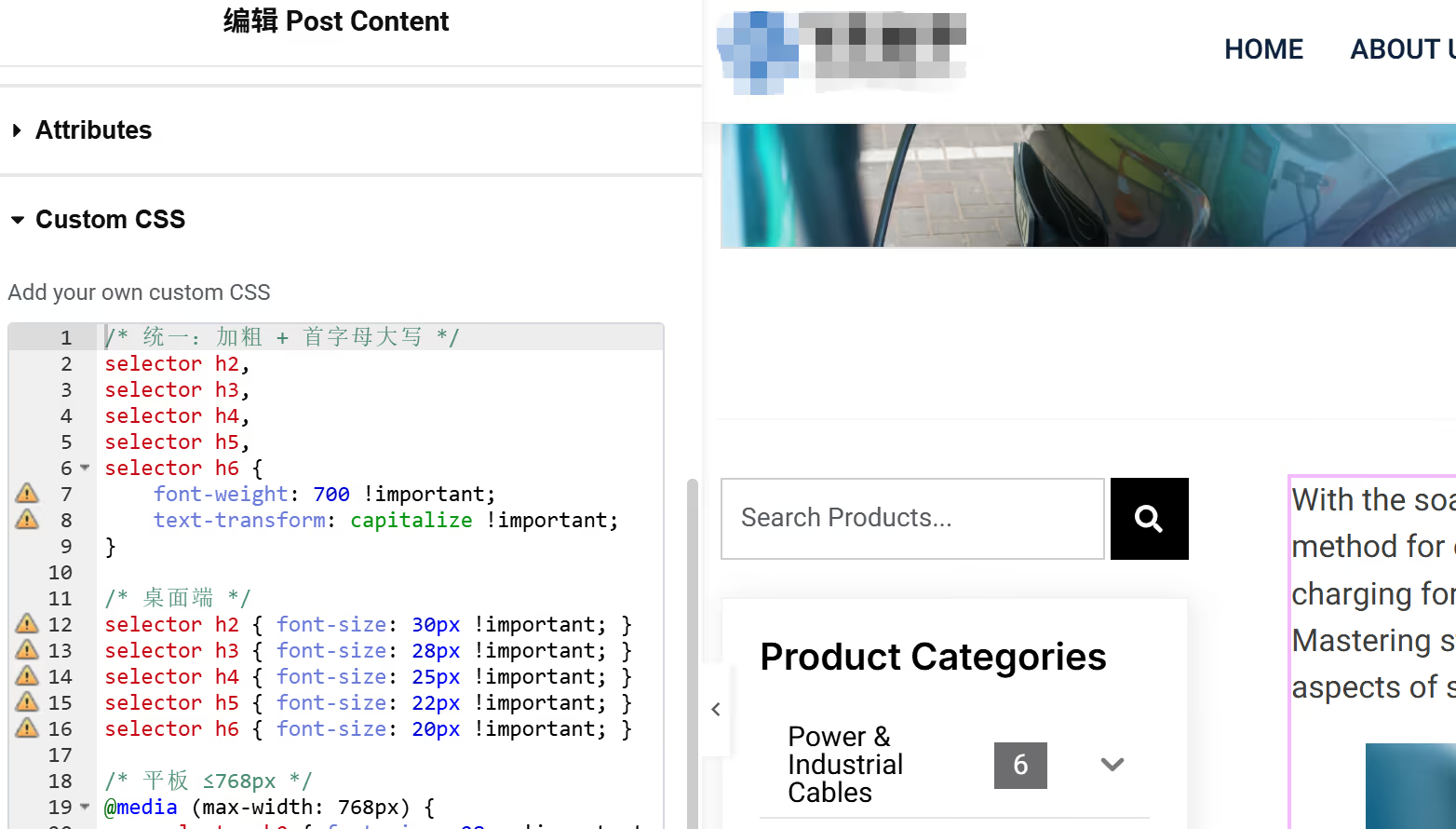
如果是Elementor编辑器,选中内容模块,打开【高级设置-Custom CSS】,代码粘贴进去就OK了。
/* 仅 文章页(post)、Woo产品页(product) 的h2-h6:加粗+首字母大写 */
body.single-post h2,
body.single-post h3,
body.single-post h4,
body.single-post h5,
body.single-post h6,
body.single-product h2,
body.single-product h3,
body.single-product h4,
body.single-product h5,
body.single-product h6 {
    font-weight: 700 !important;
    text-transform: capitalize !important;
}

/* 桌面端 */
body.single-post h2, body.single-product h2 { font-size: 30px !important; }
body.single-post h3, body.single-product h3 { font-size: 28px !important; }
body.single-post h4, body.single-product h4 { font-size: 25px !important; }
body.single-post h5, body.single-product h5 { font-size: 22px !important; }
body.single-post h6, body.single-product h6 { font-size: 20px !important; }

/* 平板 ≤768px */
@media (max-width: 768px) {
    body.single-post h2, body.single-product h2 { font-size: 28px !important; }
    body.single-post h3, body.single-product h3 { font-size: 25px !important; }
    body.single-post h4, body.single-product h4 { font-size: 22px !important; }
    body.single-post h5, body.single-product h5 { font-size: 20px !important; }
    body.single-post h6, body.single-product h6 { font-size: 18px !important; }
}

/* 手机 ≤480px */
@media (max-width: 480px) {
    body.single-post h2, body.single-product h2 { font-size: 25px !important; }
    body.single-post h3, body.single-product h3 { font-size: 22px !important; }
    body.single-post h4, body.single-product h4 { font-size: 20px !important; }
    body.single-post h5, body.single-product h5 { font-size: 18px !important; }
    body.single-post h6, body.single-product h6 { font-size: 16px !important; }
}
如果你的网站文章、产品详情页模板不是使用Elementor编辑器定制的,可以稍微修改代码,如上所示。
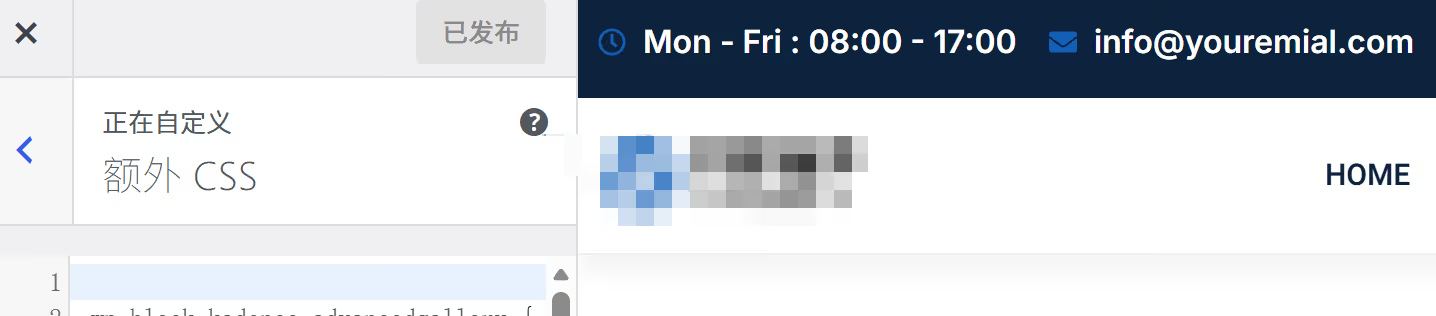
然后打开【外观-自定义CSS】,把代码粘贴进去就可以了。
OK,今天分享完毕。
如果这篇内容对您有帮助,请给个五星分享一下哦!
[总体评分: 1 平均: 5]

wordpress外贸建站服务
WORDPRESS外贸建站案例

wordpress主机/服务器推荐
wordpress外贸建站课程

玩转云服务器和虚拟主机
常见问题

© Copyright 2020~2026. 悦然网络工作室/悦然wordpress建站 专注中小企业wordpress建站 All Rights Reserved.网站地图
本站图片来源为Pexels、Pixabay、Freepik、Unsplash等图片库的免费许可,CC0协议;还有部分为自己手绘或AI生成,版权碰瓷请自重!法律服务:law@yueranseo.com
蜀ICP备20016391号-1
 川公网安备 51011502000367号